- OBJECT
- 2024 PT5
- MEAN RESIDUAL
- 0.635833″
- GEO TRACK
- 3695pts
- SPAN
- 2023.8–2026.2
- EXTENT
- 38.72M km
- CLOSEST
- 0.00377AU
2024 PT5 · Following a geocentric orbit
It circles the Earth, then slips away.
Check [Geo] in the orbit diagram, and the view recenters from the Sun to the Earth. Nowhere does this view earn its keep more than with objects a planet has temporarily captured — minimoons. Using 2024 PT5 as the subject, this page follows one continuous procedure: from loading the observations to the moment a single track appears on screen, winding around the Earth and drifting away.
The screenshots on this page were taken with the Japanese edition. The English edition shows the same screens with English labels.
This view took no special math.
I had assumed that drawing an Earth-centered orbit would take major surgery — something like moving the center of gravity from the Sun to the Earth. It took nothing of the kind.
At every integration step, the perturbation calculation already computes, for each perturbing body, “heliocentric position of the object − heliocentric position of the planet.” For the Earth, that is the geocentric rectangular position, as is. All that was left was to keep a record of it and connect the points in order.
That makes the [Geo] view different in kind from the other orbit diagrams. It is not a two-body conic section; it is the very points the perturbed integration actually passed through. A path that loops around the Earth again and again cannot be drawn as a single conic. You can see it only in this view. —— I will never forget the moment it first appeared on screen.
Worth reading first
The orbit diagram page covers how to operate this window (rotate, zoom, pan, reset) and what each button around [Geo] does. If orbit computation itself is new to you, work through the tutorial once first.
The subject — 2024 PT5.
A near-Earth asteroid discovered on August 7, 2024, by ATLAS at Sutherland, South Africa. It is about 10 meters across (estimates range from 5 to 42 m). From September 29 to November 25, 2024, the Earth held it temporarily, and in January 2025 a study proposed that it is debris blasted off the Moon by an impact. It is one of the few minimoons you can work out entirely on your own in OrbitLife.
OrbitLife puts the closest approach to the Earth at 2024 Aug. 8.875, 0.00377 AU (about 560,000 km), and the closest approach to the Moon at 2024 Aug. 13.0, 0.00333 AU.
First, bring up the empty view.
STEP 1
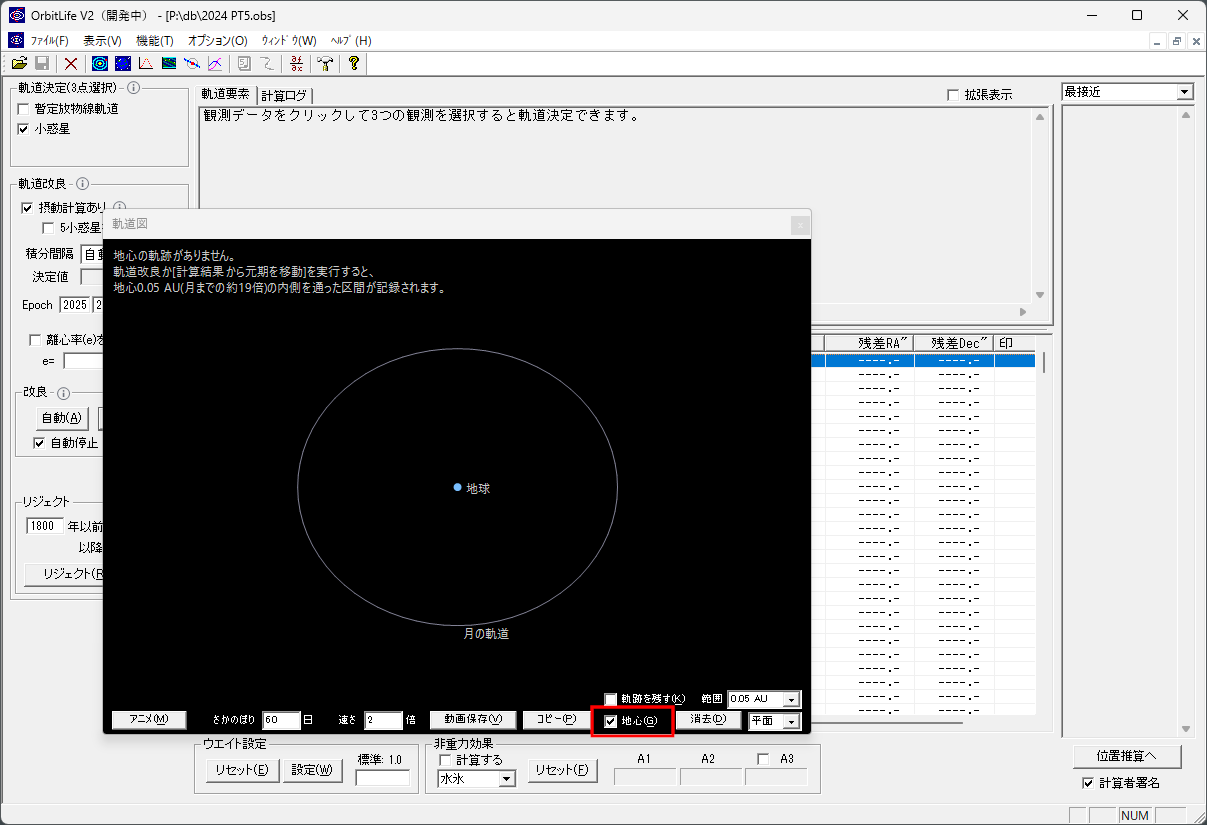
Load the observations and check [Geo]
Open the orbit diagram and check [Geo] at the lower right. Nothing has been computed yet, so the view shows only the Moon's orbit, along with a note telling you what to do to build up a track. This is the starting point.
STEP 2
Pick three observations for an initial orbit
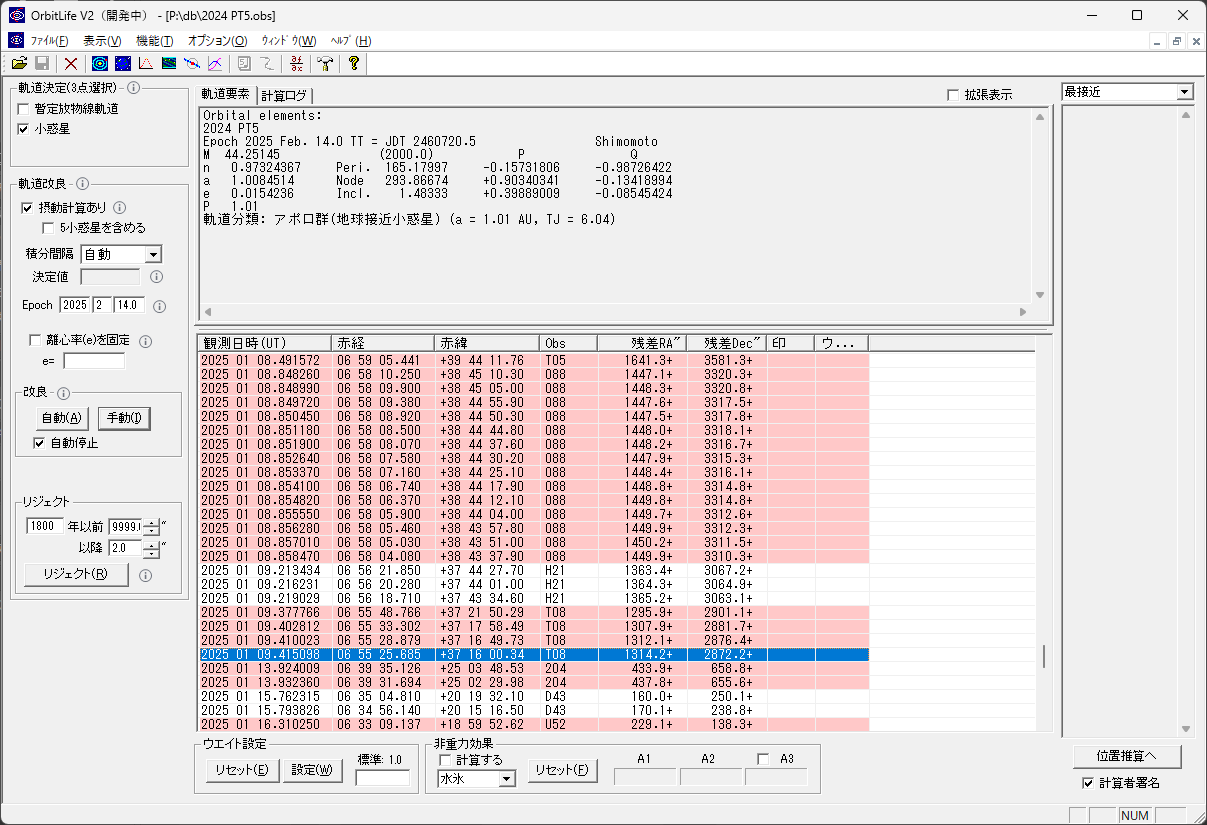
Choose three observations, stepping back from the last one by two weeks to a month each. A provisional orbit comes out: a = 1.0084514 AU, e = 0.0154236, i = 1°.48333, P = 1.01 yr. It is classified as Apollo (near-Earth asteroid) · TJ = 6.04. The residuals are still 1,400–3,500 arcsec.
Set them aside, and converge.
STEP 3
Select the misfits and force-reject them
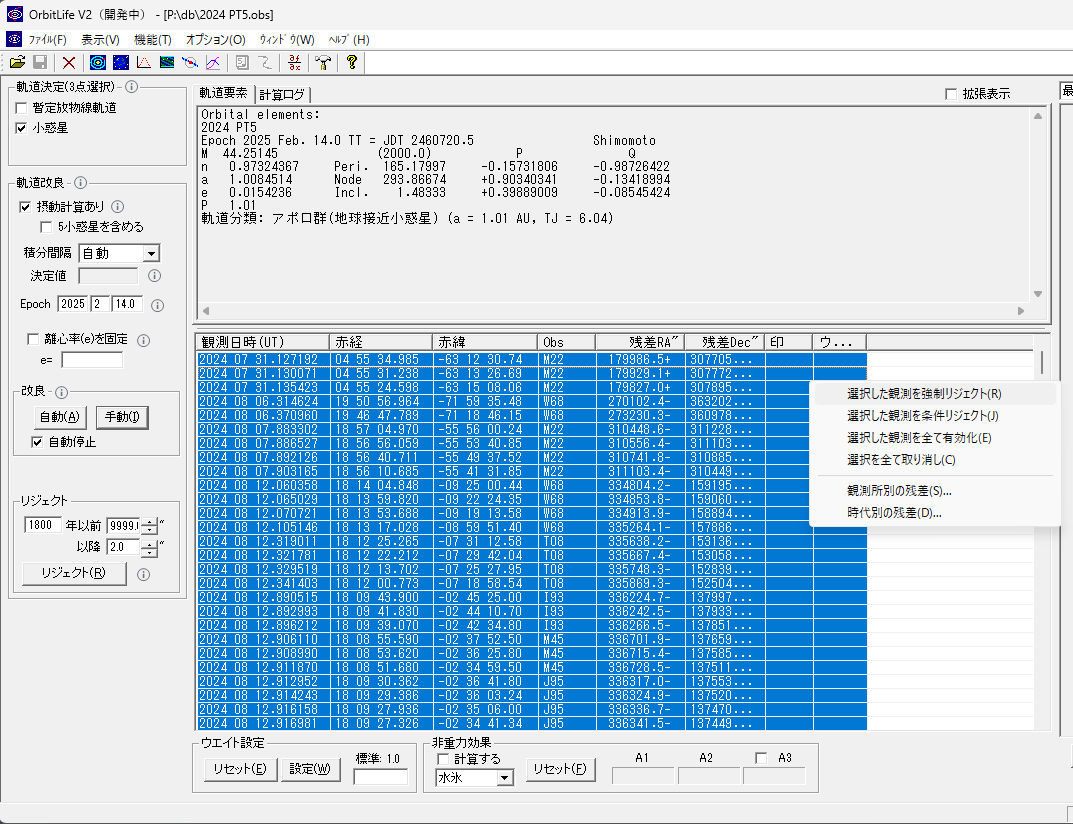
The July–August 2024 observations — the ones from around discovery — have residuals of 179,986 arcsec. In degrees, that is about 50°. With these on board, the improvement goes nowhere. Select that range in the list, right-click, and choose [Force-Reject Selected Observations].
STEP 4
Keep improving — this is where the track appears
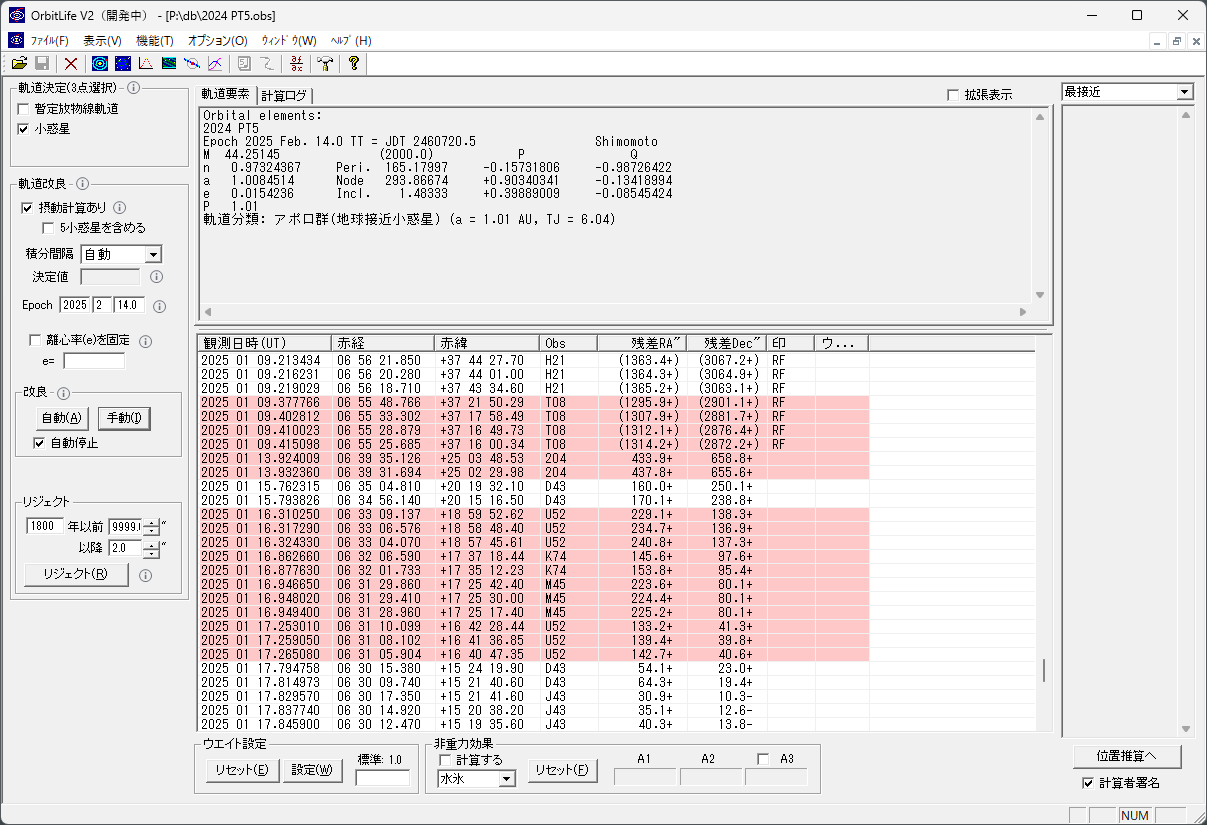
Press [Manual] again and again with the remaining observations. Every run of the perturbation integration adds the stretches that passed within 0.05 AU of the Earth to the record. This is the moment the first track appears.
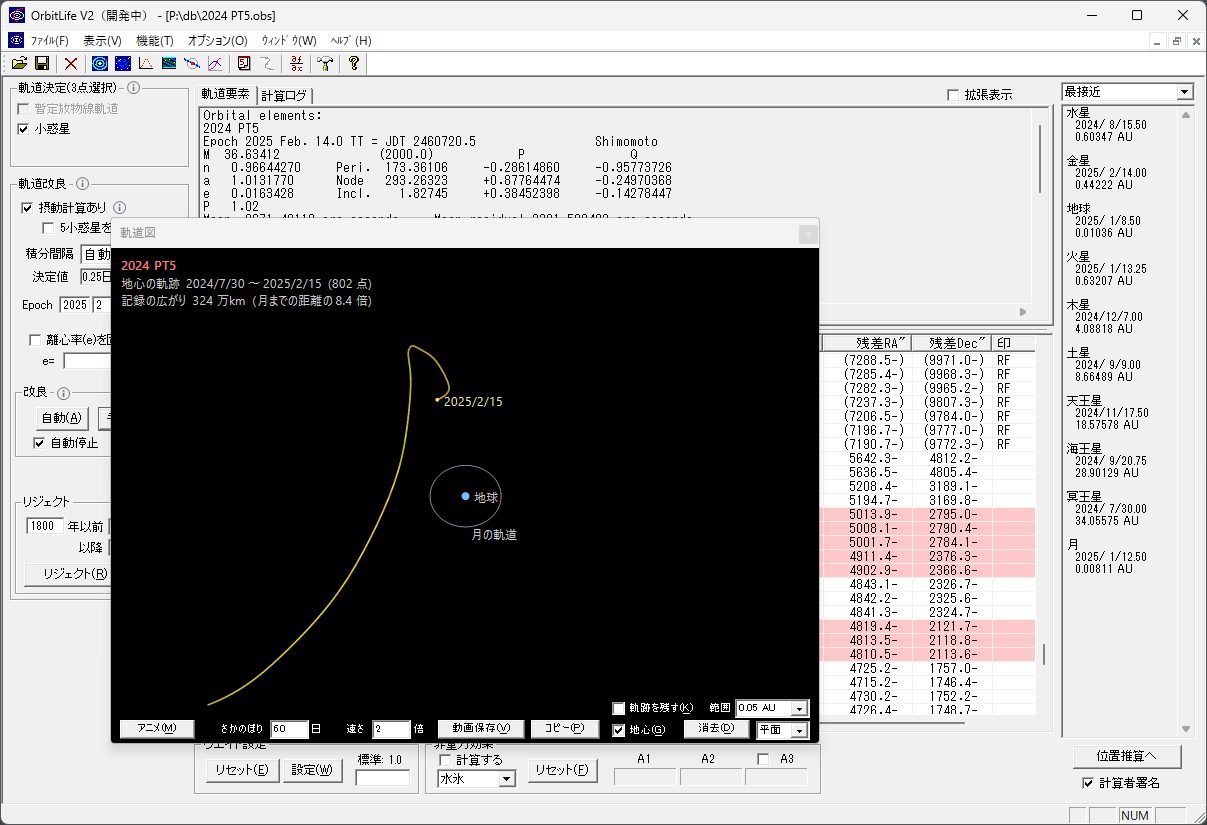
Keep improving, and the points multiply, the line smooths out, and a shape that turns back near the Earth begins to emerge. 1,593 points, 3.86 million km, 10.0 times the lunar distance.
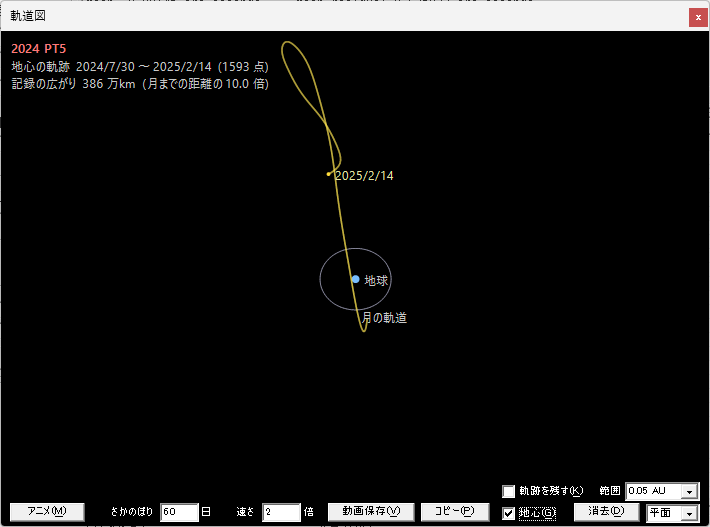
This one converged with [Manual] alone — about 15 presses
[Manual] is the normal way to improve an orbit. Each press lowers the residuals, and most objects converge in two or three.
2024 PT5 took about 15. [Auto] was never used.
Being a minimoon does not, by itself, call for [Auto].
With some objects, each improvement lowers the residuals only slightly, and getting them small enough takes
hundreds of presses. In that case, uncheck [Auto stop], press [Auto], and press [Cancel]
once the residuals stop falling. The tutorial
explains when to use which.
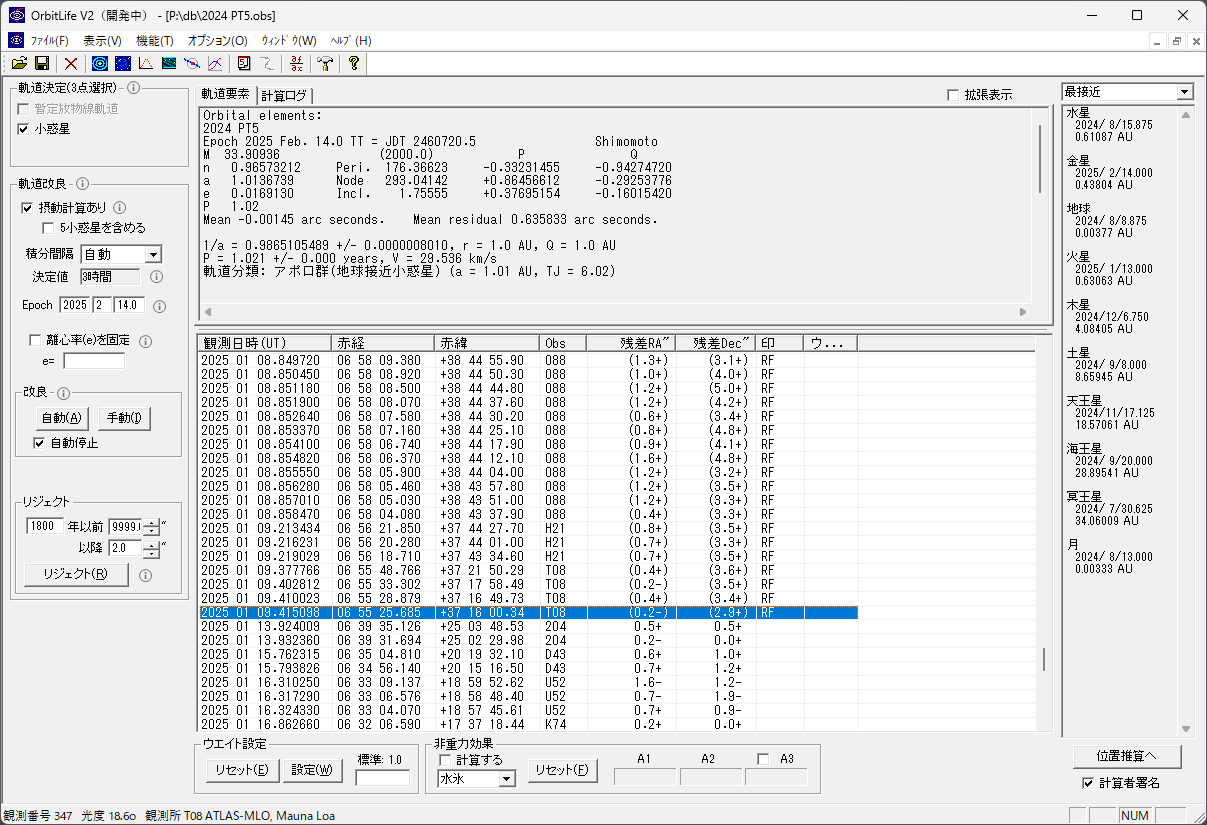
Bring them back, and solve for sunlight.
STEP 5
Enable everything and add non-gravitational effects
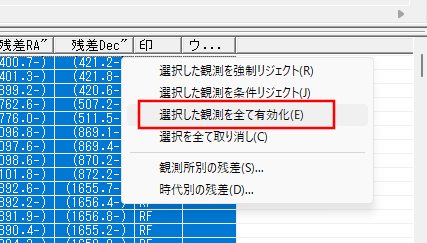
Restore the observations excluded in STEP 3. Select them in the list, right-click, and choose [Enable All Selected Observations].
Then check [Solve] under [Nongravitational Effects] at the bottom of the window and improve again. A₁ = 0.0059336, A₂ = 0.0008430. The restored 2024 observations now fit within 0″.1–4″.4.
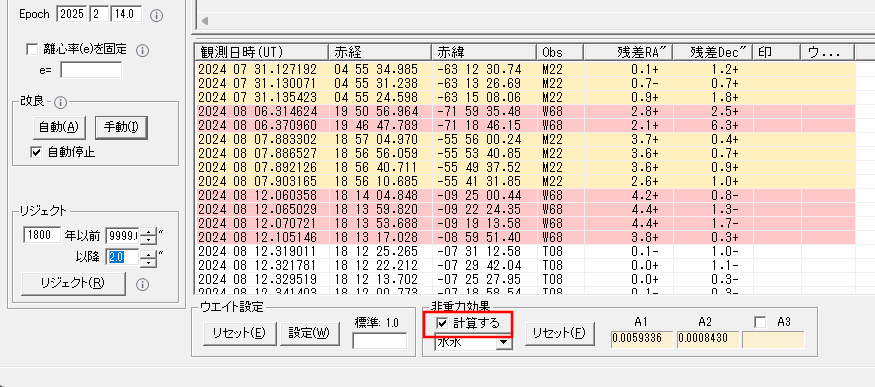
Why give an asteroid non-gravitational effects — radiation pressure
In a comet, non-gravitational effects are the recoil of gas jetting out as ice sublimates. 2024 PT5 is an asteroid;
nothing jets out of it. Yet non-gravitational effects still matter.
For a body only about ten meters across, the pressure of sunlight itself is not negligible.
A₁ is defined as positive pointing away from the Sun (the same convention as Marsden et al. 1973). If sunlight is
doing the pushing, the force points outward, so it ought to come out positive — and it did. The sign agrees with the physics.
But the right sign is only a necessary condition
Add two parameters, and the residuals will almost always go down. That alone is no proof the force is real. When A₁ comes out negative, you read it as “a sign that something is missing on the computational side.” Treat a positive A₁ with the same rigor — see The Final Call and the record of (1566) Icarus.
STEP 6
Set a threshold and reject
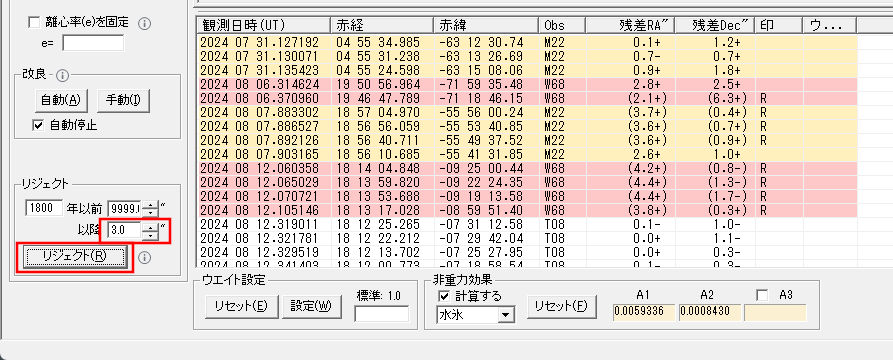
With everything down to a few arcseconds, set the threshold to 3.0 arcsec and press [Reject] once more. Observations with large residuals get an R. From here on, finish with [Manual].
Stretch the track beyond the observations.
STEP 7
Look at the track so far
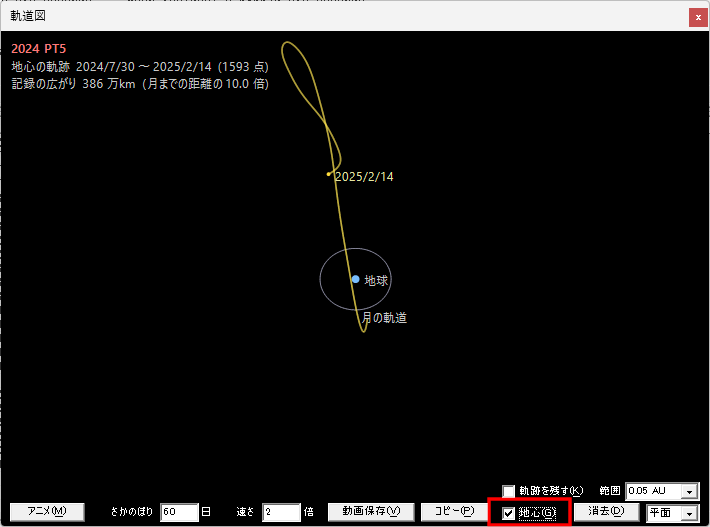
Go back to the [Geo] view. 1,593 points, 3.86 million km. A tall, narrow loop is about to close near the Earth. But what is drawn here covers only the span of the observations.
STEP 8
Widen the [Span]
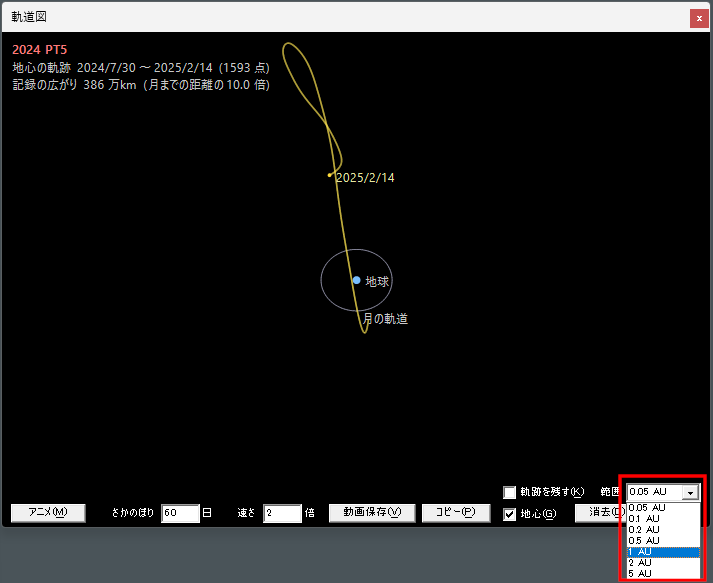
The default 0.05 AU is about 19 times the distance to the Moon. That covers the motion while the object is captured, but the track is cut off where it heads away from the Earth. For objects like 2024 PT5 that come and go near the Earth, widening [Span] connects the stretches outside as well. Here we chose 1 AU.
STEP 9
Extend the integration itself with [Move Epoch of Solution]
This is the crux of the whole procedure. A track builds up only where the integration has gone. To draw beyond the observed span, you have to extend the integration. The tool for that is [Move Epoch of Solution].
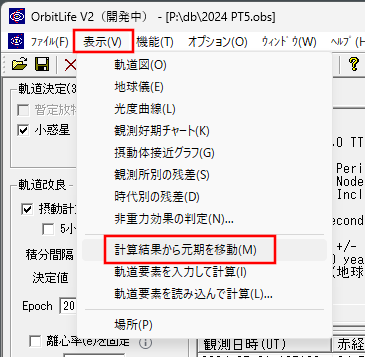
From the menu.
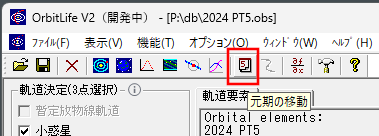
Or from the toolbar button — same thing.
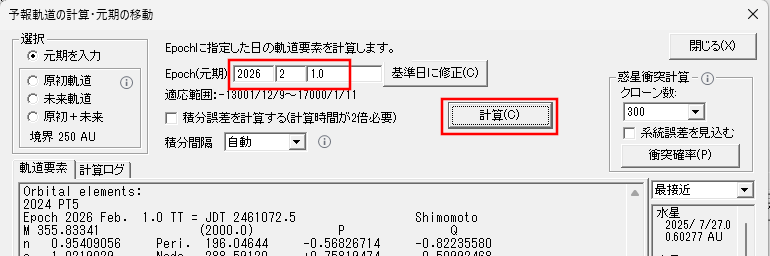
First, into the past. The first observation is from July 31, 2024, so enter an earlier epoch, 2023 Aug. 1.0, and press [Compute].
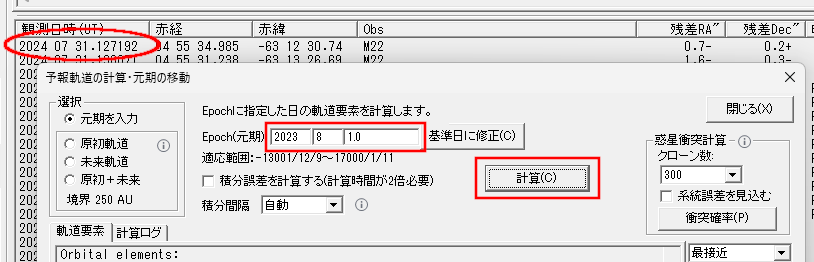
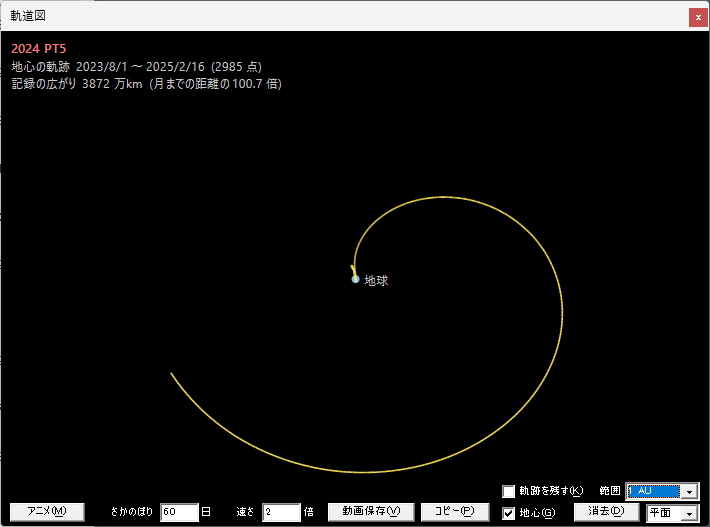
Next, into the future. Same procedure, this time with an epoch of 2026 Feb. 1.0.
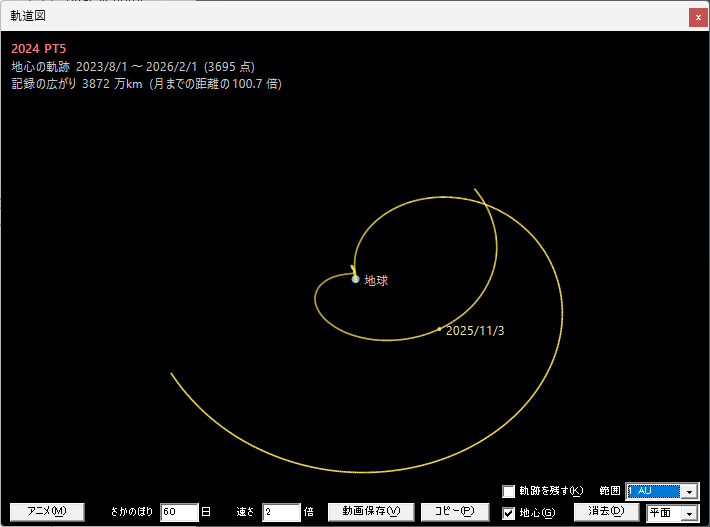
Spin it, zoom in, see it in 3D.
STEP 10
Move the viewpoint
Left-drag to rotate; use the wheel to zoom. Lines that seem to overlap when flattened onto a plane turn out, from another angle, to pass at different heights.
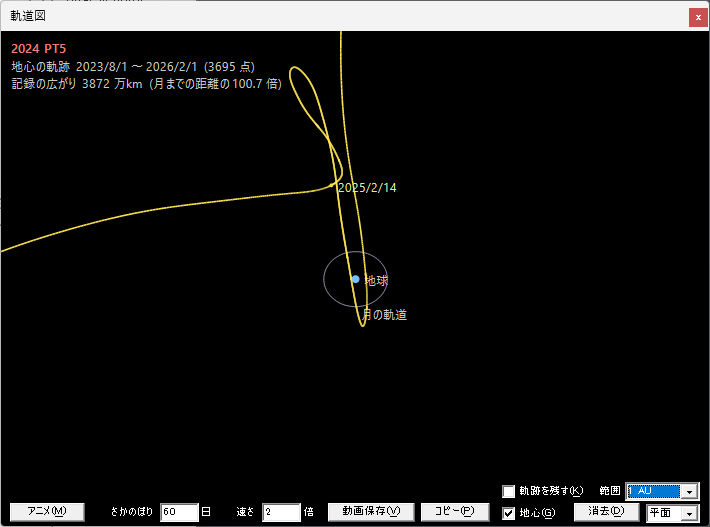
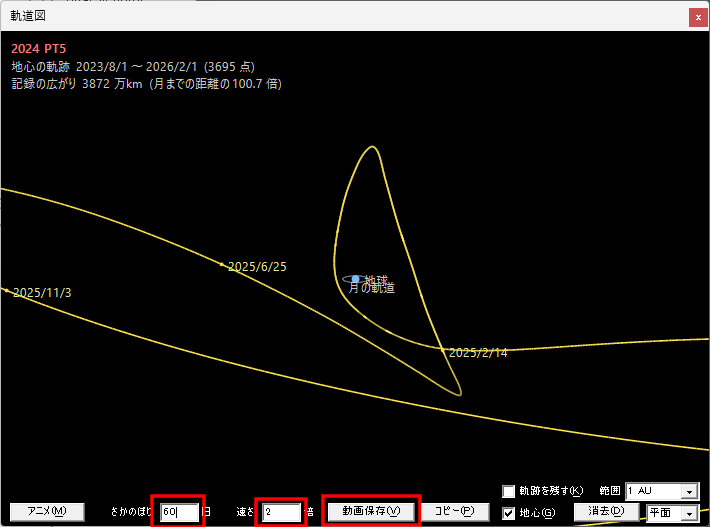
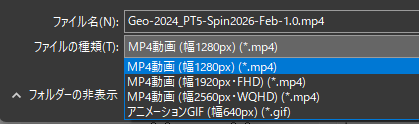
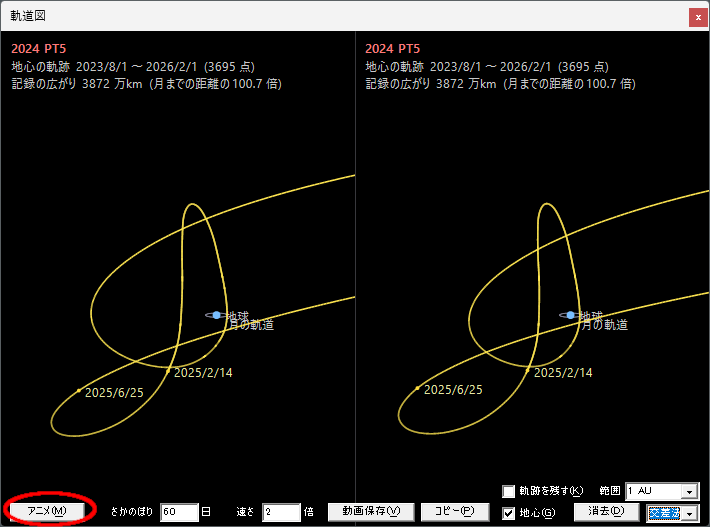
[Animate] and [Save Video] in Geo mode
The geocentric track is a single curve drawn from one date to another, so there is nothing to play forward in time. Instead, [Animate] in Geo mode takes the viewpoint once around the Earth — one full turn in 9 seconds. [Trail] is not used. [Speed] sets the number of frames written out: at 2×, the video is half as long. There is no pause at the end, either — after one turn the view is back where it started, and stopping there would break the seamless loop on repeat playback.
STEP 11
Go stereo to tell the near side of the loop from the far side
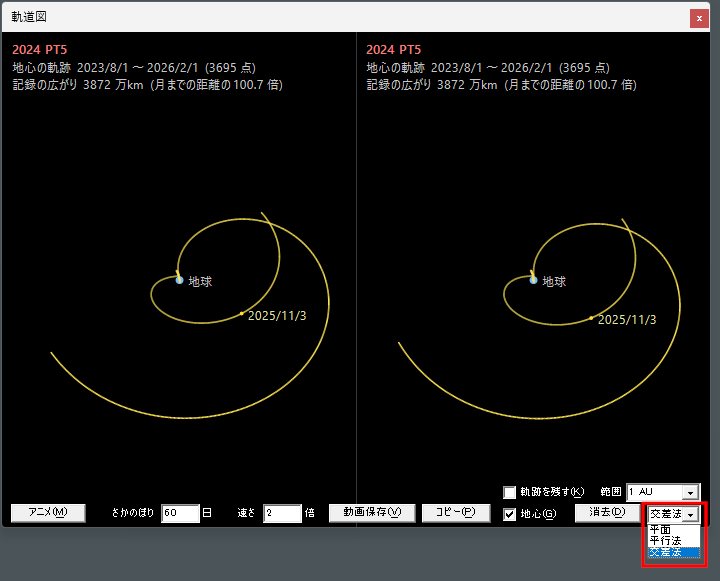
Set the selector at the lower right to [Parallel] or [Cross-eyed], and two images appear side by side, with the viewpoint swung 2.5° to the left and to the right. A geocentric track is an ideal subject for stereo viewing. It is nothing but points and lines, with none of the confusing textures a photograph has, so the near and far sides of the loop separate cleanly.
2006 RH120, solved as well.
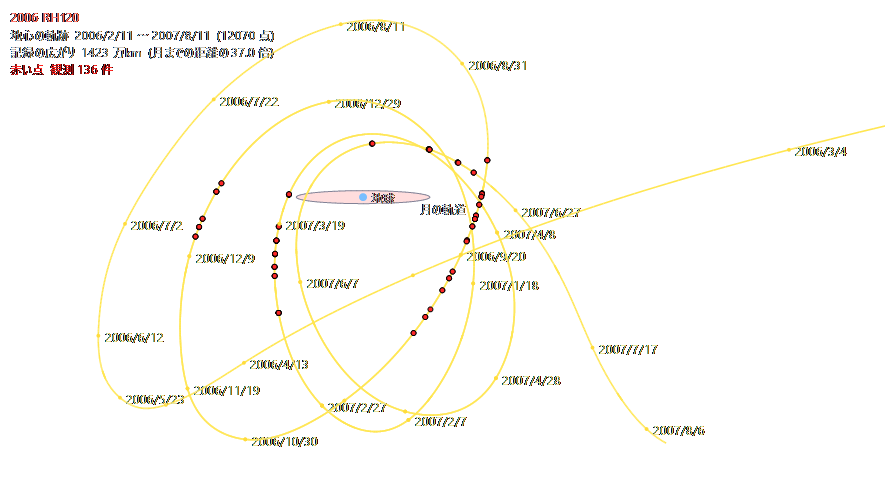
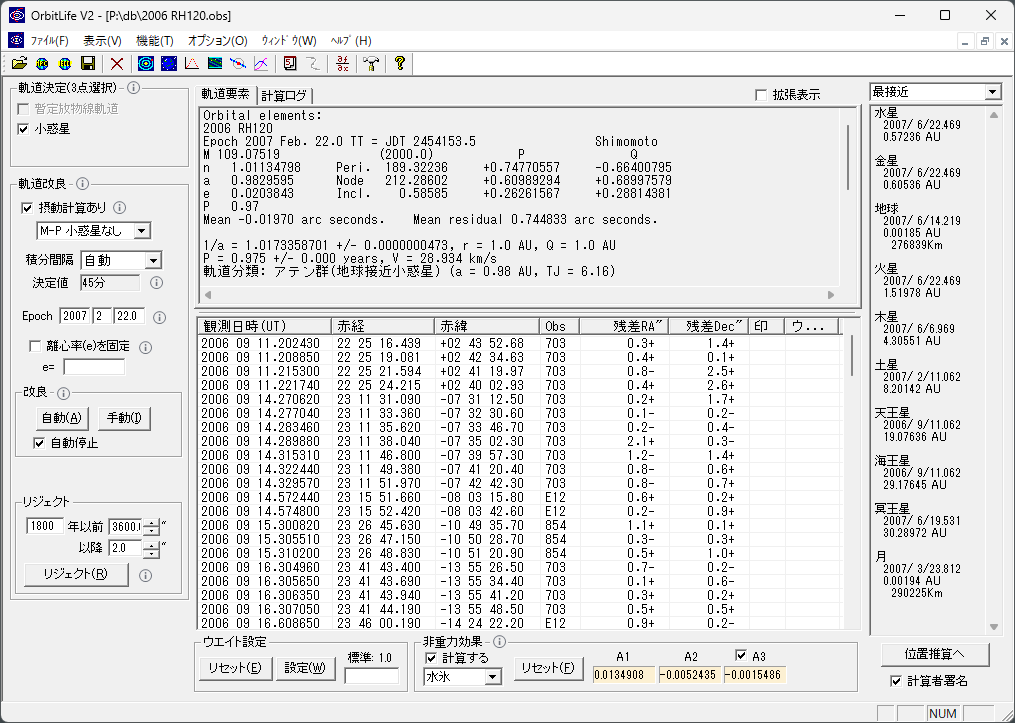
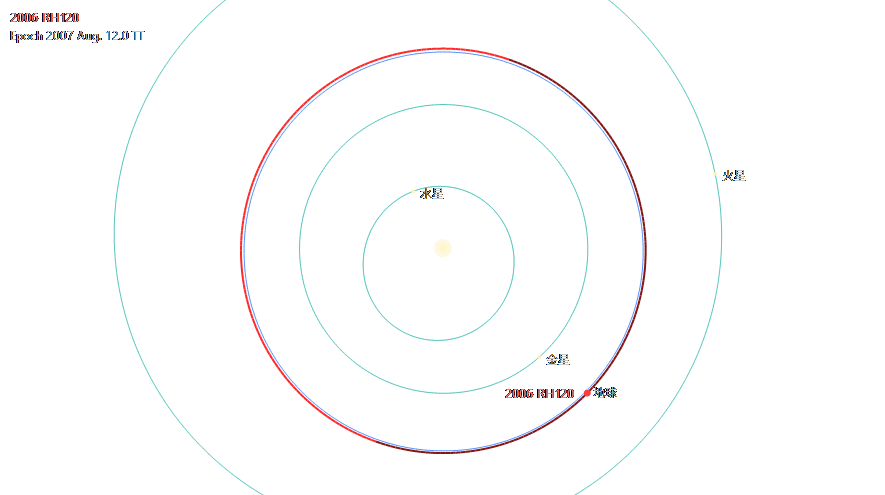
2024 PT5 made one loop near the Earth and left. 2006 RH120 was held by the Earth for about a year, from mid-2006 to the summer of 2007, and circled the Earth several times during its stay. It is thought to be 2–3 meters across.
The first version of this page said, “2006 RH120 remains a task for the future.” Later improvements changed that: it can now be solved with OrbitLife alone. The answer key is the orbit published by NASA's Jet Propulsion Laboratory (JPL).
COMPARE
Checking against JPL's orbit
From JPL's orbit solution (#54), I took the position and velocity at the same epoch, 2007 Feb. 22.0 TT, and compared.
| Quantity | OrbitLife minus JPL |
|---|---|
| Heliocentric position | 2.9 km |
| Velocity | 2.8 mm/s |
| Time of perihelion T | 0.00023 d (20 s) |
| Perihelion distance q | 2.1 × 10⁻⁷ AU (about 31 km) |
| Eccentricity e | 9 × 10⁻⁸ |
| Inclination i | agrees to 5 decimals (0°.58585) |
At that moment, 2006 RH120 is 1.307 million km from the Earth. A 2.9 km difference is under 0.46 arcsec as seen from the Earth — smaller than the error of a single observation.
| Non-grav. parameter (au/day²) | OrbitLife | JPL (±1σ) |
|---|---|---|
| A₁ (radial, away from the Sun) | +1.349 × 10⁻¹⁰ | +1.407 ± 0.083 × 10⁻¹⁰ |
| A₂ (along the motion) | −5.24 × 10⁻¹¹ | −4.91 ± 0.71 × 10⁻¹¹ |
| A₃ (normal to the orbital plane) | −1.55 × 10⁻¹¹ | −1.20 ± 0.35 × 10⁻¹¹ |
All three fall within JPL's uncertainties. The A₁ = 0.0134908 on screen is this value expressed in units of 10−8 au/day². A₁ is positive — the direction of being pushed outward by sunlight.
Why they don't match exactly
JPL used 132 of the 136 observations, weighted each one, and corrected for star-catalog systematic errors.
OrbitLife gives all 136 observations equal weight. JPL's residual of 0.414 arcsec is a weighted value,
so it cannot be compared directly with OrbitLife's 0.745 arcsec.
Measured with the same yardstick (136 observations, unweighted), JPL's orbit gives 0.81 arcsec and OrbitLife's solution 0.745 arcsec.
By that yardstick, there is no better solution left to find.
The few kilometers that remain come from the different yardsticks, not from unfinished refinement.
DYNAMICS
What made the difference — a slightly technical note
Around closest approach, 2006 RH120 was 277,000 km from the Earth. At that distance, 1 arcsec corresponds to 1.3 km. An observatory position off by just a few kilometers moves the residuals by several arcseconds. Tiny errors you could ignore for an ordinary asteroid all come to the surface here. Solving it took the following. The first item mattered most.
OrbitLife's non-gravitational formula is the one for sublimating water ice in comets (Marsden type). Near 1 AU, the way it varies with distance from the Sun is almost the same as the 1/r² of radiation pressure. 2006 RH120 stays between 0.996 and 1.037 AU from the Sun, so the difference is under 1%. The water-ice formula can stand in for radiation pressure and rotational effects. As an acceleration, A₁ is about 2.7 × 10⁻⁹ m/s².
Try it yourself
Enter “2006 RH120” in [File]-[Get Observations from MPC], and all 136 observations are yours. Three hints — pick the first three observations from a narrow window, use non-gravitational effects, and enter the Epoch by hand ([Options]-[Set Epoch in the Epoch Field]). Take the three from across a wide stretch of September, and no orbit comes out at all. Pick them from within a few days, such as Sept. 11–15, keep only the observations with small residuals, and add more little by little. The comparison with JPL above doubles as your answer key.
Orbit Diagram
How this window works and what its buttons mean: rotate, zoom, pan, reset, animation, Geo mode, stereo.
→ Orbit DiagramTutorial
New to orbit computation? One step at a time, with 220P/McNaught.
→ TutorialComputing an Earth Impact
The same [Move Epoch of Solution], used for an impact instead of a capture. With 2008 TC3.
→ Impact computationSaving and Restoring Orbital Elements
The longer the trial and error, the more it pays off. Keep every digit and setting, and return to the exact same state later.
→ Save & restoreSources on 2024 PT5 and 2006 RH120.
The discovery, size, capture period and lunar origin, and the JPL orbit used as the answer key for 2006 RH120, come from the sources below. The orbital elements, residuals, approach distances and track point counts are all values computed with OrbitLife, as shown in the screenshots above.